Swipefile
  • Database
Categories
Tools
  • Business Idea Generator
  • Product Pricing Calculator
  • Gross Profit Calculator
  • View All Tools
Resources
  • What is a Swipe File?
  • Popular Posts
  • I'm Feeling Lucky
  • Contact
  • Terms of Service
  • Privacy Policy
Sponsored by
Likes (0)0RandomDatabase
Swipefile

Command Palette

Search for a command to run...

Database
Categories
  • Ads2076
  • Advice2494
  • Before & After436
  • Business Ideas141
  • Copywriting3246
  • Data1238
  • Direct Mail78
  • Emails334
  • Images1988
  • Money100
  • Motivation421
  • Pricing228
  • Print Ads690
  • Quotes196
  • Sales Pages462
  • X
    Social Media934
  • SWIPES Email179
  • Testimonials111
  • Videos528
  • Wisdom246
  • All Categories95
Business Idea Generator
Product Pricing Calculator
Gross Profit Calculator
View All Tools
What is a Swipe File?
Popular Posts
I'm Feeling Lucky
Contact
Terms of Service
Privacy Policy
Random
Database

Advanced Personal Finance Pricing Structure

Copywriting
Pricing
Advice
Sales Pages
·
Updated on Nov 7, 2025
personal finance pricing

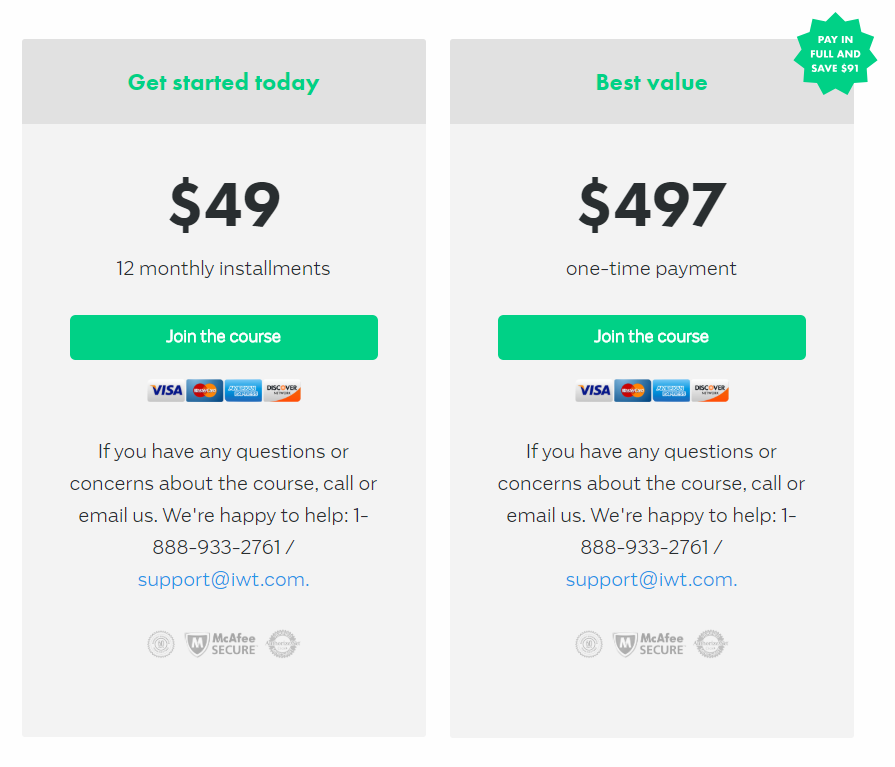
This pricing table from Ramit Sethi’s personal finance course is a masterclass in framing. Two options, same product — but smart design makes one feel like the clear winner.

The Psychology at Work

The “Best Value” tag and “Pay in full and save $91” make the higher price feel like a deal. The monthly option lowers the barrier to entry. Either way, the buyer feels smart.

Why It Works

  • Anchoring: $497 looks better once you see $49 × 12 = $588.
  • Framing: “Save $91” focuses on gain, not cost.
  • Clarity: Simple, side-by-side comparison reduces decision friction.
  • Visual cues: Color and “Best value” badge direct the eye.

Examples

  • Netflix tiers make premium look affordable next to “Basic.”
  • AppleCare upsells by showing “one-time” vs “monthly.”
  • Gym memberships use “annual saves 20%” to lock longer terms.
  • Adobe’s “pay annually” plan saves 16%, increasing up-front revenue.

Analyzed by Swipebot

Loading analysis...

Ad