Basecamp Features and Benefits Image
Updated on
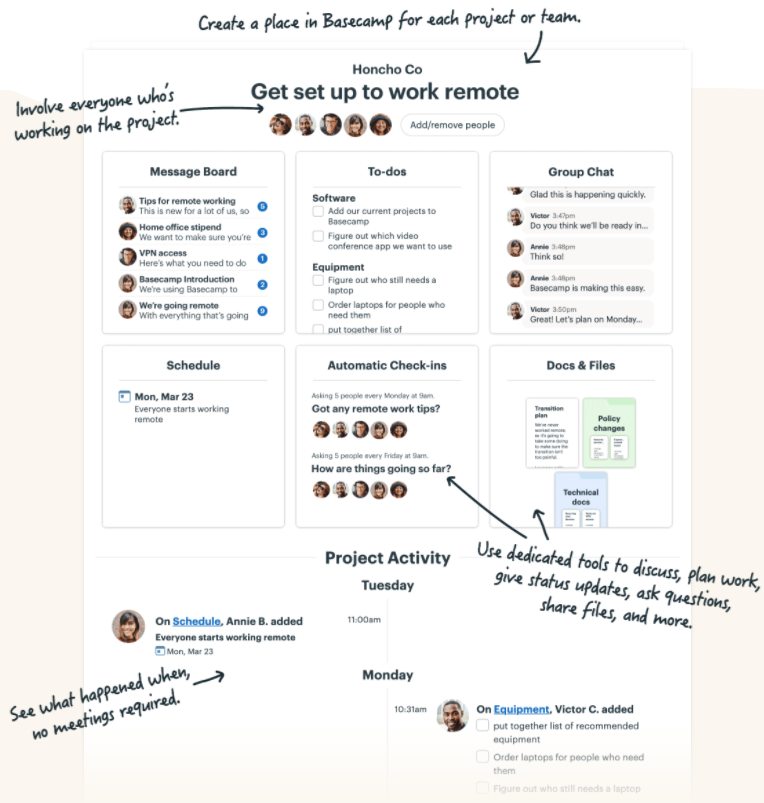
Basecamp nails clarity with this annotated screenshot. Each callout explains what a section does, why it’s useful, and how it helps you work remotely. It’s like a friendly tour of the product—fast, visual, and super digestible.
Why It Works
- Shows the product in action instead of describing it
- Uses conversational language (“Got any remote work tips?” feels human)
- Highlights benefits and features at the same time
- Guides the viewer’s eye step by step like a visual funnel
Real-World Examples
- Notion’s onboarding tooltips teach features inside the app
- Slack’s “What’s New” pop-ups use visual callouts for fast learning
- Figma’s release emails use annotated screenshots to showcase updates
Analyzed by Swipebot
Loading analysis...