Swipefile
  • Database
Categories
Tools
  • Business Idea Generator
  • Product Pricing Calculator
  • Gross Profit Calculator
  • View All Tools
Resources
  • What is a Swipe File?
  • Popular Posts
  • I'm Feeling Lucky
  • Contact
  • Terms of Service
  • Privacy Policy
Sponsored by
Likes (0)0RandomDatabase
Swipefile

Command Palette

Search for a command to run...

Database
Categories
  • Ads2076
  • Advice2494
  • Before & After436
  • Business Ideas141
  • Copywriting3246
  • Data1238
  • Direct Mail78
  • Emails334
  • Images1988
  • Money100
  • Motivation421
  • Pricing228
  • Print Ads690
  • Quotes196
  • Sales Pages462
  • X
    Social Media934
  • SWIPES Email179
  • Testimonials111
  • Videos528
  • Wisdom246
  • All Categories95
Business Idea Generator
Product Pricing Calculator
Gross Profit Calculator
View All Tools
What is a Swipe File?
Popular Posts
I'm Feeling Lucky
Contact
Terms of Service
Privacy Policy
Random
Database

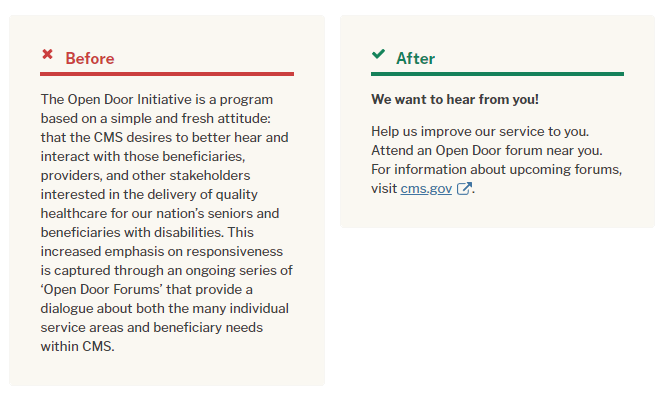
Remove excess words, use “more info” links

Copywriting
Before & After
Advice
·
Source
Updated on Nov 7, 2025
we-want-to-hear-in-plain-text

Look at that transformation! The “Before” version drowns readers in details. The “After” version? It’s short, clear, and gets you to take action fast.

Marketing analysis

This rewrite nails a key rule: clarity converts. Instead of overexplaining, the short version gives the main idea and sends curious folks to a detailed page. That means fewer words, faster understanding, and more engagement.

Why it works

  • People scan, they don’t read
  • Short lines boost comprehension
  • Calls-to-action pop when surrounded by whitespace
  • Extra info belongs behind a link, not in the main copy

Examples

  • Apple product pages: clean copy, with specs hidden in tabs
  • Airbnb listings: short descriptions, details under “show more”
  • Dropbox homepage: one sentence + sign-up button = millions of users
Source (plainlanguage.gov)

Analyzed by Swipebot

Loading analysis...

Ad