Swipefile
  • Database
Categories
Tools
  • Business Idea Generator
  • Product Pricing Calculator
  • Gross Profit Calculator
  • View All Tools
Resources
  • What is a Swipe File?
  • Popular Posts
  • I'm Feeling Lucky
  • Contact
  • Terms of Service
  • Privacy Policy
Sponsored by
Likes (0)0RandomDatabase
Swipefile

Command Palette

Search for a command to run...

Database
Categories
  • Ads2074
  • Advice2488
  • Before & After436
  • Business Ideas140
  • Copywriting3243
  • Data1237
  • Direct Mail78
  • Emails333
  • Images1986
  • Money100
  • Motivation419
  • Pricing228
  • Print Ads690
  • Quotes196
  • Sales Pages462
  • X
    Social Media931
  • SWIPES Email178
  • Testimonials111
  • Videos526
  • Wisdom245
  • All Categories95
Business Idea Generator
Product Pricing Calculator
Gross Profit Calculator
View All Tools
What is a Swipe File?
Popular Posts
I'm Feeling Lucky
Contact
Terms of Service
Privacy Policy
Random
Database

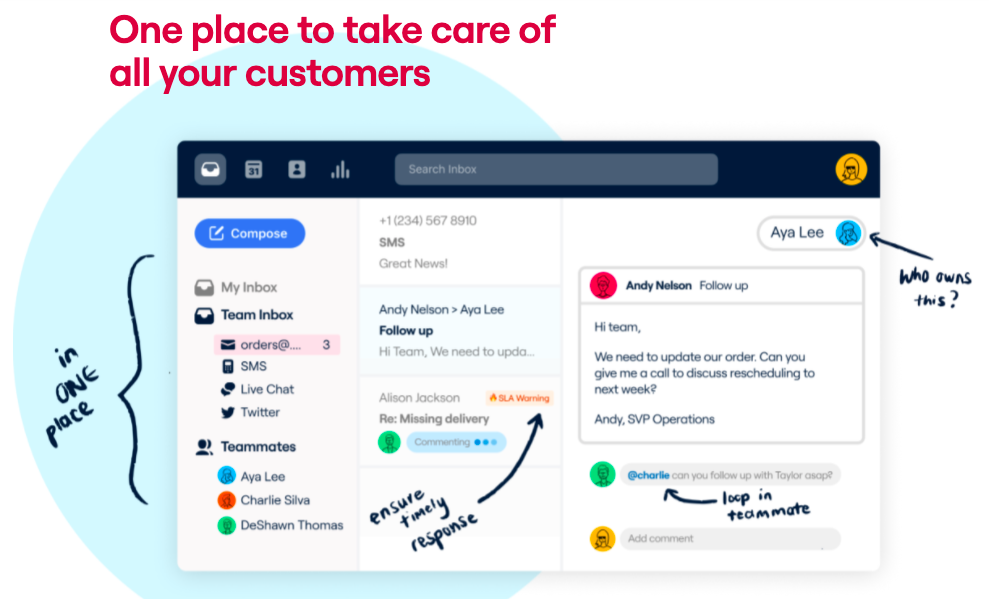
Hand drawn explanation of web dashboard

Images
Advice
Product Descriptions
·
Source
Updated on Nov 8, 2025
product description website

This image nails how to sell software without a wordy pitch. Instead of listing features, it shows them right where your eyes naturally want to look.

Marketing analysis

The annotated screenshot does all the talking. Arrows, hand‑written notes, and simple phrasing make the product easy to “get” in seconds. It’s visual storytelling 101 — show context, not clutter.

Why it works

  • Reduces cognitive load with clear visual hierarchy
  • Uses real interface instead of abstract mockups
  • Makes the viewer imagine themselves using it
  • Visual annotations act like a mini demo
  • Reinforces simplicity — “everything in one place”

Examples

  • Slack uses playful arrows in onboarding screens to teach key actions.
  • Notion’s homepage GIFs show the product in motion, not just describe it.
  • Figma’s “interface previews” compress a live demo into one glance.
Source (front.com)

Analyzed by Swipebot

Loading analysis...
Ad