Swipefile
  • Database
Categories
Tools
  • Business Idea Generator
  • Product Pricing Calculator
  • Gross Profit Calculator
  • View All Tools
Resources
  • What is a Swipe File?
  • Popular Posts
  • I'm Feeling Lucky
  • Contact
  • Terms of Service
  • Privacy Policy
Sponsored by
Likes (0)0RandomDatabase
Swipefile

Command Palette

Search for a command to run...

Database
Categories
  • Ads2076
  • Advice2494
  • Before & After436
  • Business Ideas141
  • Copywriting3246
  • Data1238
  • Direct Mail78
  • Emails334
  • Images1988
  • Money100
  • Motivation421
  • Pricing228
  • Print Ads690
  • Quotes196
  • Sales Pages462
  • X
    Social Media934
  • SWIPES Email179
  • Testimonials111
  • Videos528
  • Wisdom246
  • All Categories95
Business Idea Generator
Product Pricing Calculator
Gross Profit Calculator
View All Tools
What is a Swipe File?
Popular Posts
I'm Feeling Lucky
Contact
Terms of Service
Privacy Policy
Random
Database

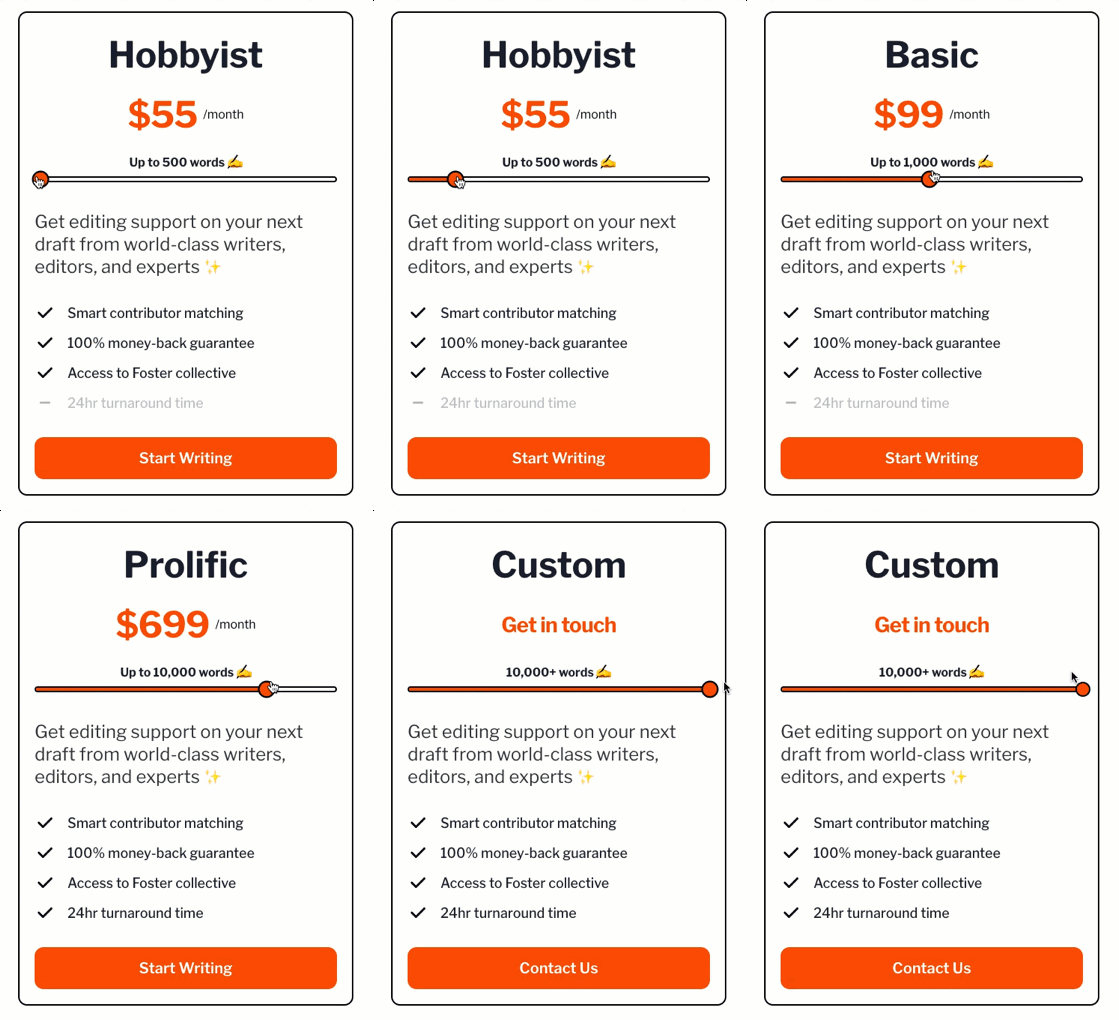
Interactive pricing graphic for writing app

Copywriting
Pricing
Advice
Sales Pages
·
Source
Updated on Nov 8, 2025
pricing calc for app

This Foster pricing block nails it. Everything from the slider to the CTA button makes it feel simple, fair, and fast to act on. It’s a masterclass in conversion-friendly design.

Why this pricing design works

  • Uses clear tiers so users instantly see what they get.
  • Keeps pricing predictable as needs (word count) go up.
  • Visual slider engages users and makes the offer feel customizable.
  • Consistent CTA placement (“Start Writing”) encourages quick action.
  • Social proof cues (“world-class writers,” “Foster collective”) add trust.

Real-life examples of pricing clarity

  • Grammarly shows tiered benefits (free, premium, business) right above each price.
  • Canva Pro compares side-by-side plans with a bright upgrade button.
  • Notion uses simple plan names (“Plus,” “Business”) and an obvious CTA below every box.
Source (foster.co)

Analyzed by Swipebot

Loading analysis...

Ad