Swipefile
  • Database
Categories
Tools
  • Business Idea Generator
  • Product Pricing Calculator
  • Gross Profit Calculator
  • View All Tools
Resources
  • What is a Swipe File?
  • Popular Posts
  • I'm Feeling Lucky
  • Contact
  • Terms of Service
  • Privacy Policy
Sponsored by
Likes (0)0RandomDatabase
Swipefile

Command Palette

Search for a command to run...

Database
Categories
  • Ads2074
  • Advice2488
  • Before & After436
  • Business Ideas140
  • Copywriting3243
  • Data1237
  • Direct Mail78
  • Emails333
  • Images1986
  • Money100
  • Motivation419
  • Pricing228
  • Print Ads690
  • Quotes196
  • Sales Pages462
  • X
    Social Media931
  • SWIPES Email178
  • Testimonials111
  • Videos526
  • Wisdom245
  • All Categories95
Business Idea Generator
Product Pricing Calculator
Gross Profit Calculator
View All Tools
What is a Swipe File?
Popular Posts
I'm Feeling Lucky
Contact
Terms of Service
Privacy Policy
Random
Database

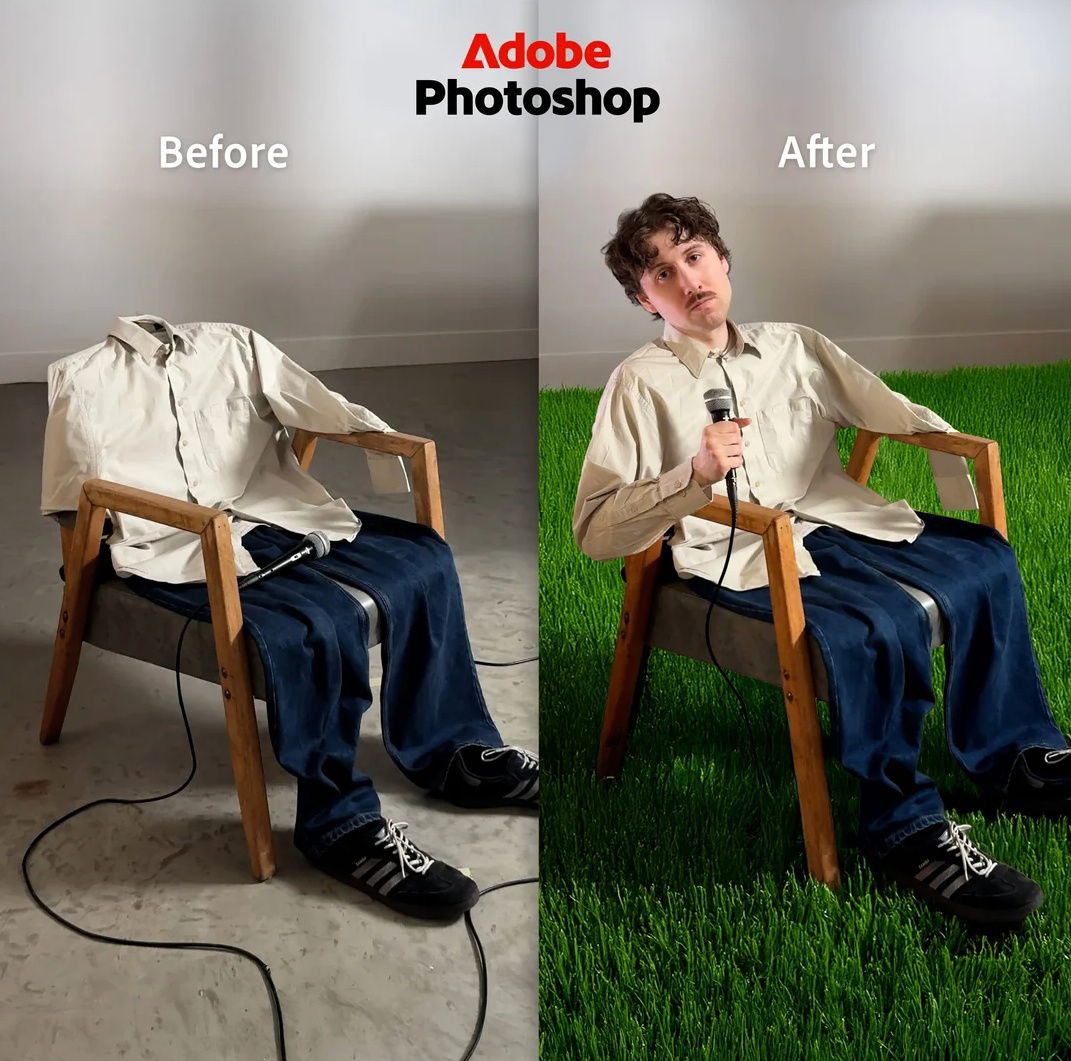
Adobe Photoshop Ads

Ads
Before & After
Images
·
Updated on Nov 8, 2025
just-use-these-two-images-adobe-photoshop-ads.png

These Adobe Photoshop ads are like mini magic shows. Simple “Before” and “After” images, zero fluff, just straight-up visual proof of what Photoshop can do.

The Marketing Magic

Each ad uses contrast to make the message click instantly. The left side shows “raw reality,” the right side shows “Photoshop power.” No text, no jargon, no tutorial—just a clear visual transformation.

Why It Works

  • Instant clarity: You get it in half a second.
  • Visual proof: Shows, doesn’t tell.
  • Emotionally satisfying: Watching a weak image turn into wow feels good.
  • Product as hero: Photoshop literally creates the magic.

Real-World Examples

  • Dyson shows dirty filters vs. clean filters in ads.
  • Crest uses yellow vs. white teeth shots.
  • Weight loss programs use “Day 1 vs. Day 30” photos.
  • Apple’s “Shot on iPhone” proves quality through images, not specs.

Analyzed by Swipebot

Loading analysis...
Ad