US -vs- THEM ad with image and reasons

Updated on
factor-ad.png

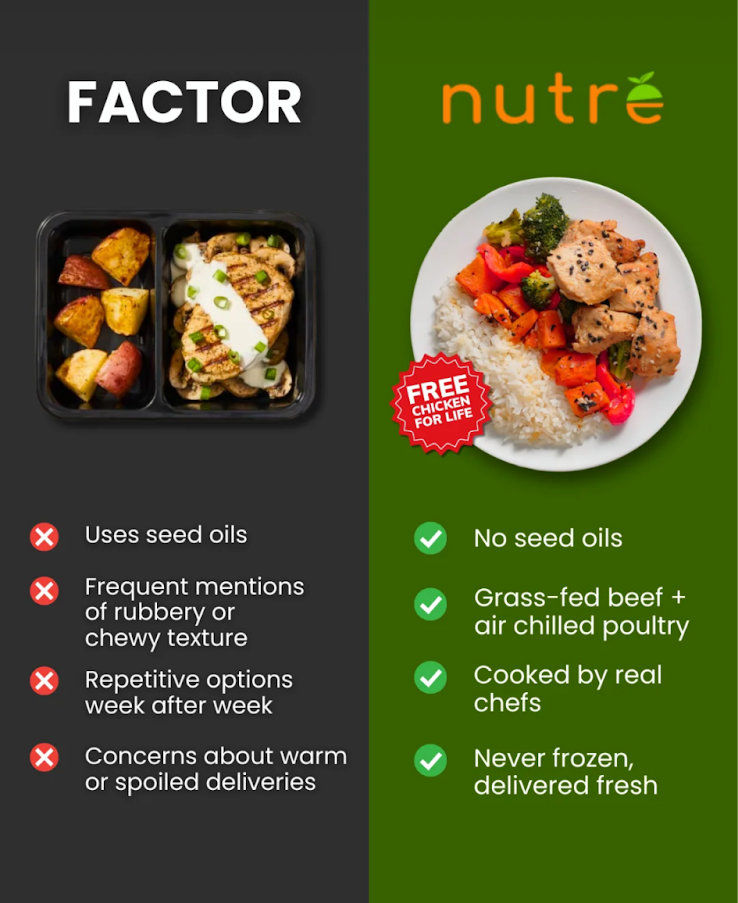
Nutré pulls off a brilliant side-by-side comparison that instantly wins the viewer’s gut reaction. One look, and you already know which meal looks fresher, healthier, and more trustworthy.

Marketing Analysis

This image nails contrast marketing. The dark gray for Factor screams “processed,” while Nutré’s bright green feels “fresh.” Add clean design, green checkmarks, and a “FREE chicken for life” badge, and Nutré dominates the decision-making moment in under two seconds.

Why It Works

  • Contrast reduces mental friction
  • Positive symbols anchor trust
  • Simple, credible claims (“No seed oils”) speak volumes
  • Structured comparison tells the story fast
  • Colors align with brand emotion (gray = dull, green = health)

Examples

  • Pepsi’s “Taste Challenge” comparisons
  • Apple’s Mac vs. PC ads
  • Slack vs. Email simplicity charts
  • Dollar Shave Club’s “fancy vs. simple” ads
  • Avis’s iconic “We Try Harder” rivalry

Analyzed by Swipebot

Element Detection

This is how AI such as ChatGPT and Gemini see this image.

factor-ad.png

Text Statistics & Scores

An elementary to middle school score is best since it’s simple to understand.

High School

10th-12th grade level

109

Total Words

5

Total Sentences

22.0

Words / sentence

57

Flesch Score

Copywriting Frameworks

Analyze the frameworks of the text

Features/Benefits
80%

The text explicitly lists product attributes (features) and links them to positive outcomes (benefits), illustrating the classic Features vs. Benefits framework.

  • Feature: "No seed oils" → Benefit: Implies healthier meal option.
  • Feature: "Delivered fresh" → Benefit: Suggests superior quality and taste.
  • Feature: Dark gray vs. green color schemes → Benefit: Conveys straightforwardness vs. vitality.
  • Feature: Black container vs. white plate → Benefit: Suggests practicality vs. freshness.

Color Palette

These are the colors pulled from the image.

Charcoal Gray

35%

Fresh Green

25%

Pure White

15%

Highlight Red

8%

Checkmark Green

6%

Accent Orange

4%

Light Gray

4%

Black

3%

Command Palette

Search for a command to run...