Swipefile
  • Database
Categories
Tools
  • Business Idea Generator
  • Product Pricing Calculator
  • Gross Profit Calculator
  • View All Tools
Resources
  • What is a Swipe File?
  • Popular Posts
  • I'm Feeling Lucky
  • Contact
  • Terms of Service
  • Privacy Policy
Sponsored by
Likes (0)0RandomDatabase
Swipefile

Command Palette

Search for a command to run...

Database
Categories
  • Ads2074
  • Advice2488
  • Before & After436
  • Business Ideas140
  • Copywriting3243
  • Data1237
  • Direct Mail78
  • Emails333
  • Images1986
  • Money100
  • Motivation419
  • Pricing228
  • Print Ads690
  • Quotes196
  • Sales Pages462
  • X
    Social Media931
  • SWIPES Email178
  • Testimonials111
  • Videos526
  • Wisdom245
  • All Categories95
Business Idea Generator
Product Pricing Calculator
Gross Profit Calculator
View All Tools
What is a Swipe File?
Popular Posts
I'm Feeling Lucky
Contact
Terms of Service
Privacy Policy
Random
Database

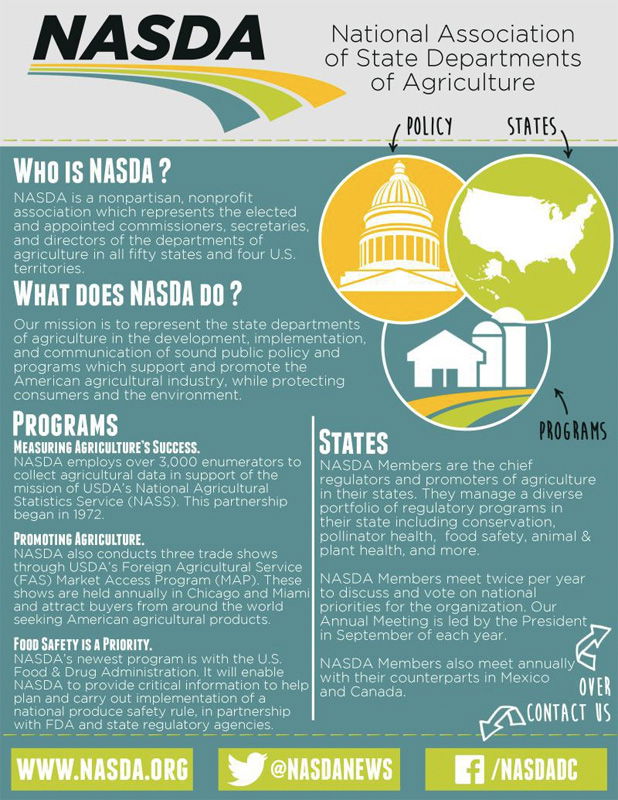
NASDA Government One Pager

Flyers
Data
Images
Advice
Sales Pages
·
Source
Updated on Nov 7, 2025
government-one-pager-nasda

Ever hand someone a flyer and watch them toss it without reading? The NASDA one-pager nails what most forget: your design should literally show people where to look. The attached heatmap proved it.

Marketing Analysis

This layout leads your eyes like it’s reading your mind. Logo first, headline second, icons third, CTA last. The color contrasts and white space make info bite-sized. Even before reading, your brain “gets it.”

Why It Works

  • Uses color to control what’s seen first
  • Icons act as road signs
  • Big headers keep people anchored
  • Short text chunks prevent fatigue
  • CTAs sit exactly where eyeballs land

Examples

  • Dropbox’s homepage flows headline → graphic → CTA
  • Airbnb’s host sign-up takes users through 4 visual checkpoints
  • Mailchimp’s onboarding mirrors the same clear, color-coded path
Source (copywritingcourse.com)

Analyzed by Swipebot

Loading analysis...

Ad