Ad Details | LinkedIn
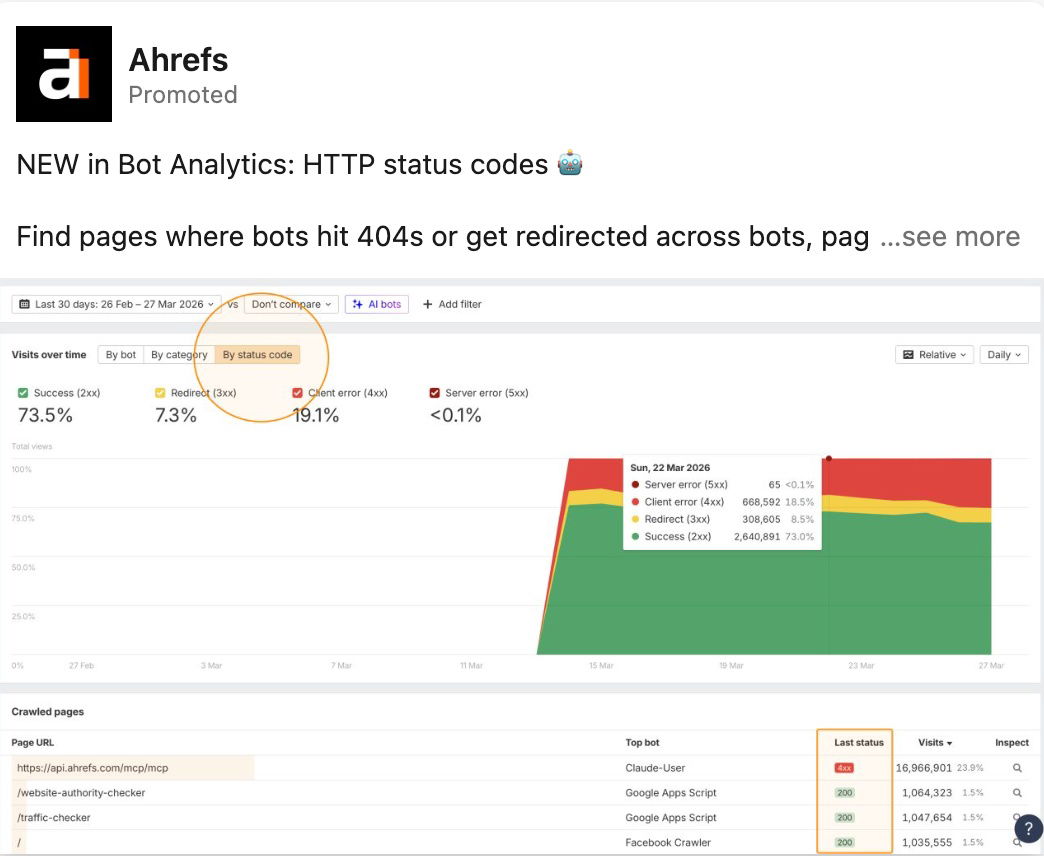
If Googlebot keeps face-planting into 404s on your site, you don’t have an SEO problem, you have a status-code problem. HTTP status codes are basically traffic lights for bots: green means go, yellow means redirect, red means error. When they’re misconfigured, bots get lost, crawl budget gets torched, and rankings quietly leak away. Here’s how to use status codes to hunt down and fix crawl issues before they snowball.
The psychology behind it (for bots)
Bots are predictable: they follow links, obey status codes, and stop when things look broken. When your site returns clear, consistent codes, crawlers learn what to keep, what to drop, and where the important content lives. That means more efficient crawling, fewer wasted hits on junk URLs, and faster indexing of pages that make you money.
Spot the crawl killers fast
- Track where bots hit 404 and 410 pages so you can restore, redirect, or intentionally kill dead URLs.
- Review redirect chains (301/302/307) to remove unnecessary hops that waste crawl budget.
- Watch status-code trends over time to catch sudden spikes in 5xx errors after deploys.
- Group URLs by templates or categories so one fix can clean up thousands of bad responses.
Real-world example
Ahrefs helps site owners visualize HTTP status codes across bots, pages, and categories so they can immediately see where crawlers are running into 404s or endless redirects.
Analyzed by Swipebot
Loading analysis...