Swipefile
  • Database
Categories
Tools
  • Business Idea Generator
  • Product Pricing Calculator
  • Gross Profit Calculator
  • View All Tools
Resources
  • What is a Swipe File?
  • Popular Posts
  • I'm Feeling Lucky
  • Contact
  • Terms of Service
  • Privacy Policy
Sponsored by
Likes (0)0RandomDatabase
Swipefile

Command Palette

Search for a command to run...

Database
Categories
  • Ads2074
  • Advice2488
  • Before & After436
  • Business Ideas140
  • Copywriting3243
  • Data1237
  • Direct Mail78
  • Emails333
  • Images1986
  • Money100
  • Motivation419
  • Pricing228
  • Print Ads690
  • Quotes196
  • Sales Pages462
  • X
    Social Media931
  • SWIPES Email178
  • Testimonials111
  • Videos526
  • Wisdom245
  • All Categories95
Business Idea Generator
Product Pricing Calculator
Gross Profit Calculator
View All Tools
What is a Swipe File?
Popular Posts
I'm Feeling Lucky
Contact
Terms of Service
Privacy Policy
Random
Database

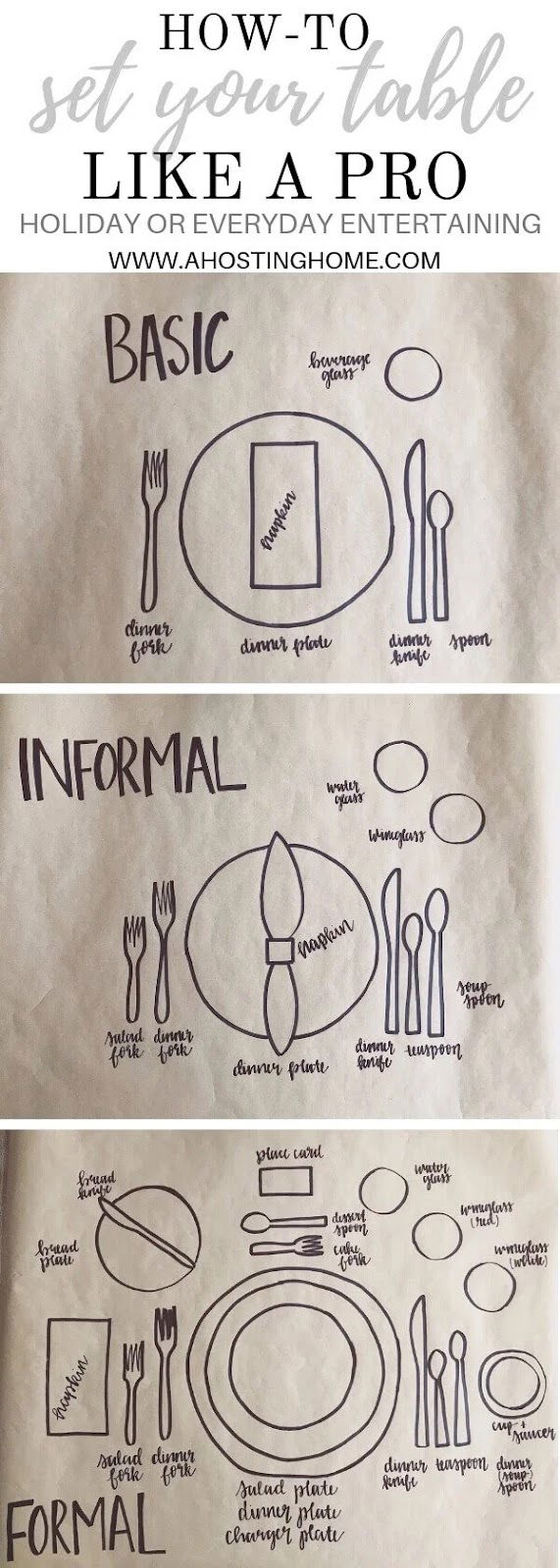
Setting a table illustration

Images
Advice
·
Source
Updated on Nov 8, 2025
Setting-a-table-illustration

This one image teaches you everything about table settings—basic to formal—in a single scroll. No clutter. No walls of text. Just simple hand-drawn visuals that make it obvious and easy.

Why this visual works

  • Hierarchy: Moves from “Basic” to “Formal,” guiding you through levels of complexity.
  • Consistency: Same style and layout across sections make it easy to follow.
  • Clarity: Uses labels and spacing to teach visually, no fluff needed.
  • Fast value: You get the full lesson in seconds—perfect for the attention-span economy.

Real-world examples of this clarity

  • IKEA instructions: Wordless guides that anyone can follow.
  • Canva templates: Teach design by visual structure, not paragraphs.
  • Infographics from HubSpot: Turn data into instantly digestible stories.
  • Dropbox sign-up page: Minimal, action-focused visuals keep it clear and effective.
Source (ahostinghome.com)

Analyzed by Swipebot

Loading analysis...

Ad