How Apps Solve Drudgery and Create Novelty
Published on
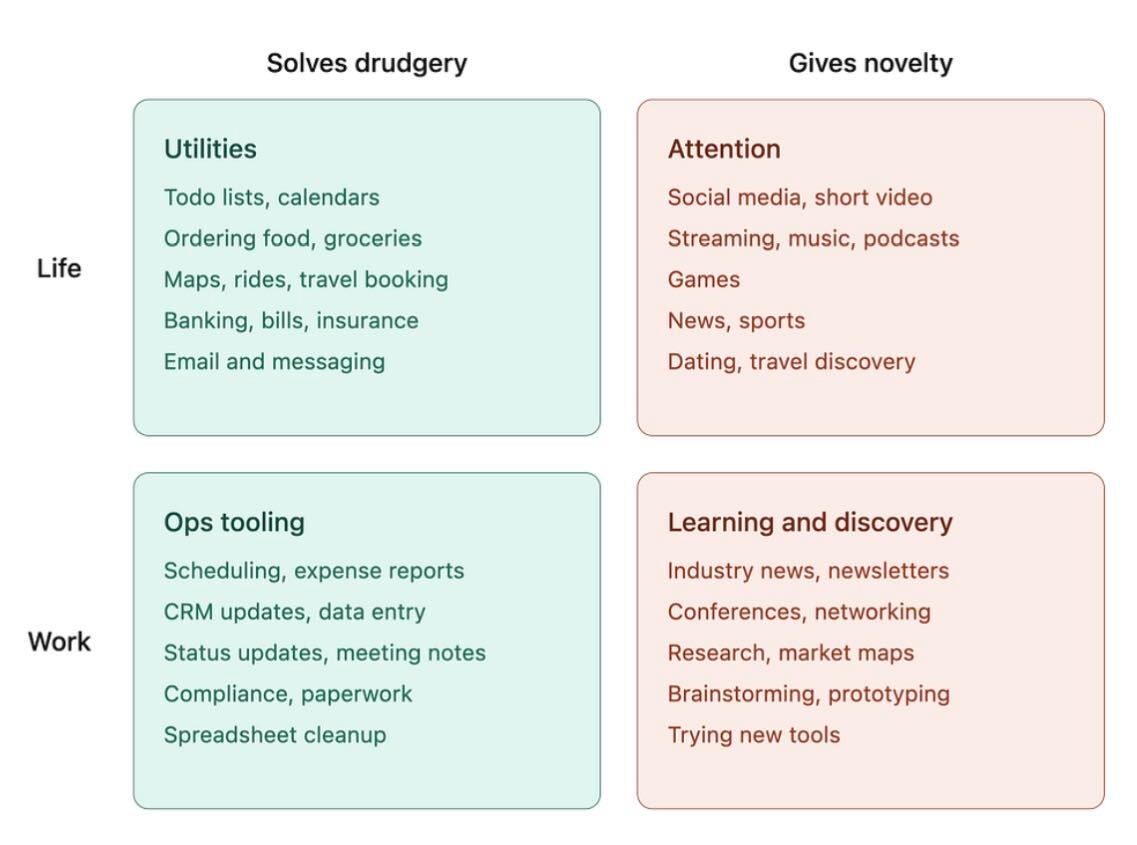
Most winning products do one of two things: they murder a boring chore or they light up someone’s curiosity. The chart you’re seeing splits everyday life and work into those two buckets: “solves drudgery” and “gives novelty.” Use it like a product cheat sheet. Pick the box your idea lives in, then crank the value in that direction instead of sitting in the vague middle where products go to die.
Read the grid like a product map
On the left, the green boxes list soul-sucking tasks: to‑dos, calendars, expense reports, CRM updates, compliance, spreadsheet cleanup. These are places to save time, clicks, and brain cells. On the right, the red boxes list attention magnets: social feeds, short video, games, news, conferences, newsletters, brainstorming tools. These are places to create surprise, delight, and identity. Your product should clearly live in one quadrant: life-utility, work-ops, attention, or learning/discovery.
How to use this for product ideas
- Choose a single quadrant from the image and ruthlessly optimize for that use case.
- If you’re in a drudgery box (utilities or ops tooling), promise a specific reduction in time, clicks, or errors.
- If you’re in a novelty box (attention or learning), promise newness: fresh content, better curation, or faster discovery.
- Scan each line item on the chart and ask, “What’s the most annoying or most addictive part here I can rebuild?”
Real products by quadrant
Todoist lives in the Life/Utilities quadrant by turning scattered to‑dos and calendars into one simple command center.
Uber sits in the Life/Utilities quadrant by removing the drudgery of hunting for rides and dealing with cash.
Slack sits in the Work/Ops tooling quadrant by collapsing status updates, meeting notes, and quick messages into one searchable stream.
TikTok lives in the Life/Attention quadrant by feeding endless short videos that scratch the itch for novelty in seconds.
Notion lives in the Work/Learning and discovery quadrant by giving teams a playground for brainstorming, prototyping, and trying new tools in one workspace.
Creative Variations
Analyzed by Swipebot
Loading analysis...