AppSumo Mega Menu Increased Conversions 5.64%
Published on
by  Noah Kagan
Noah Kagan
Noah Kagan
@noahkagan·Apr 30
New improvement I HATE that Customers LOVE on AppSumo - MEGA Menu - increased conversion 5.64% 📈 https://t.co/wCbIyYYpc8
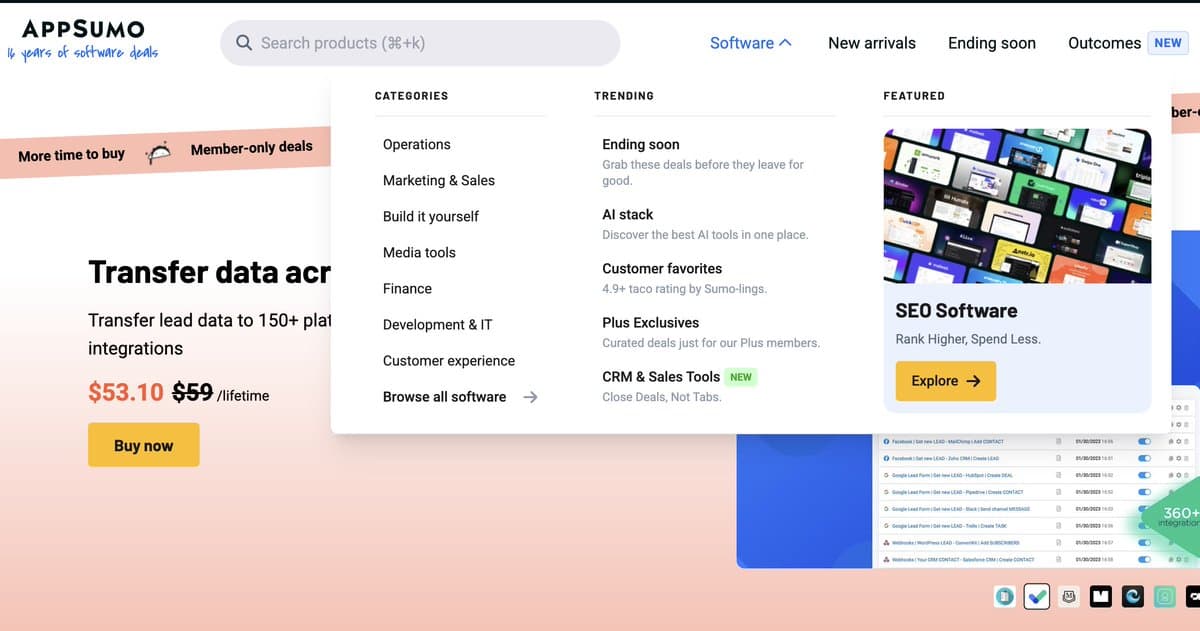
AppSumo added a big, chunky mega menu to their site and conversions bumped up 5.64%. The founder admits he personally hates the look, but customers are clearly voting with their clicks. Let’s break down what’s happening inside this one screenshot so you can steal the layout for your own site.
The psychology behind the 5.64% lift
This design wins because it trades minimalism for momentum. Instead of hiding options in tiny dropdowns, the mega menu surfaces the most profitable paths: urgent deals, high-rated products, and a hero collection. Visitors see proof that there’s a lot to explore, plus one obvious next click. It feels like walking into a well-organized store instead of guessing which door to open.
Why this mega menu prints more money
- Three clear columns (Categories, Trending, Featured) reduce thinking time and show visitors exactly where to go.
- Category labels like “Marketing & Sales” and “Development & IT” match how business buyers mentally sort tools.
- The Trending column (“Ending soon”, “Customer favorites”) taps urgency and social proof without feeling pushy.
- The big Featured card with product thumbnails and a bold “Explore” button acts like a mini-landing page inside the nav.
- Hovering the menu keeps the main CTA (“Buy now”) visible in the background, so shopping intent never gets lost.
Ways you could copy this on your own site

Shopify could split its top nav into a mega menu with columns for "Start", "Sell", "Market", and "Manage" plus a Featured App of the Week card.
Notion could highlight templates in a mega menu, with categories like "Personal", "Teams", and "Startups" alongside a large Featured Template card.
Creative Variations
Analyzed by Swipebot
Loading analysis...