Swipefile
  • Database
Categories
Tools
  • Business Idea Generator
  • Product Pricing Calculator
  • Gross Profit Calculator
  • View All Tools
Resources
  • What is a Swipe File?
  • Popular Posts
  • I'm Feeling Lucky
  • Contact
  • Terms of Service
  • Privacy Policy
Sponsored by
Likes (0)0RandomDatabase
Swipefile

Command Palette

Search for a command to run...

Database
Categories
  • Ads2099
  • Advice2511
  • Before & After437
  • Business Ideas143
  • Copywriting3264
  • Data1242
  • Direct Mail78
  • Emails334
  • Images2003
  • Money101
  • Motivation423
  • Pricing229
  • Print Ads691
  • Quotes196
  • Sales Pages465
  • X
    Social Media937
  • SWIPES Email180
  • Testimonials111
  • Videos530
  • Wisdom248
  • All Categories95
Business Idea Generator
Product Pricing Calculator
Gross Profit Calculator
View All Tools
What is a Swipe File?
Popular Posts
I'm Feeling Lucky
Contact
Terms of Service
Privacy Policy
Random
Database

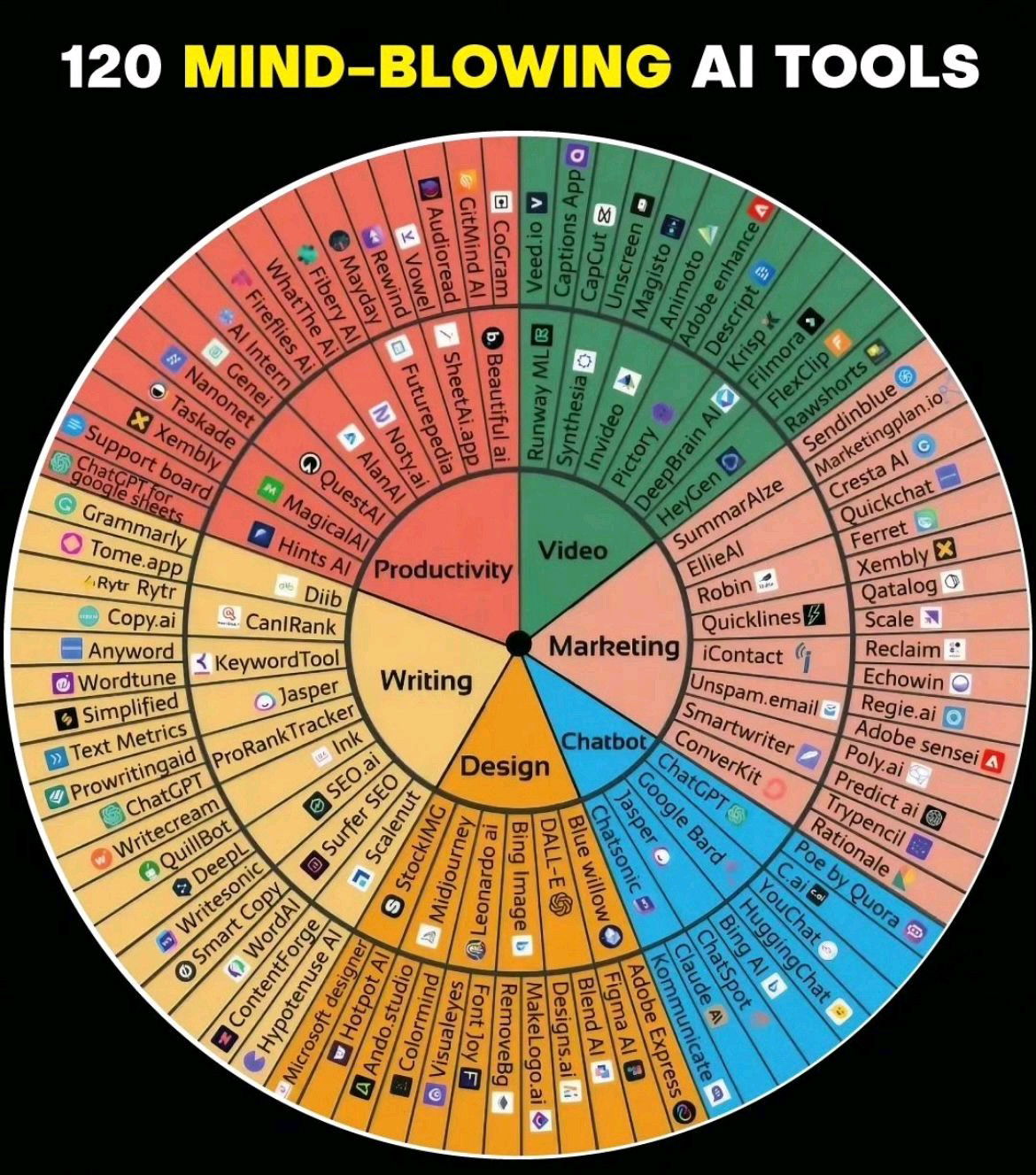
AI Wheel Chart

Data
Images
AI
Social Media
·
Updated on Nov 8, 2025
ai-tool-wheel

Someone took the “Feelings Wheel” (yes, the one from therapy offices) and remixed it into a wheel of 120 AI tools. Genius visual. It makes a chaotic topic (hundreds of new AI tools) instantly feel organized and usable.

Why This Visual Hits So Hard

  • It taps into a familiar format — people already understand how to read the Feelings Wheel.
  • It organizes complexity into clear categories (Writing, Design, Chatbots, etc.).
  • It’s inherently shareable — colorful, circular, and loaded with info.
  • It conveys authority fast: 120 labeled tools = expert-level effort.

Real-World Examples

  • HubSpot’s “MarTech landscape” chart grouped 8,000+ tools and went viral.
  • Gartner’s Magic Quadrant works for the same reason — visual authority.
  • Canva’s weekly design trend wheels get high engagement on LinkedIn.

Analyzed by Swipebot

Loading analysis...

Ad